Wednesday, May 23, 2007

LinkRez documentation, early draft

The following is a VERY early draft of documentation for LinkRez. It will likely be split to MANY pages, and have COPIOUS screenshots. There will probably be a quick-start guide, and then a series of lessons, generating more and more complex necklaces.

This page will probably disappear, when more finalized and illustrated documentation is completed, but for now, this will give people a sense of LinkRez's complexity and power, as well as help early testers.

Besides more testing, I think I'd like to write a utility that will help people generate some standard tiny prims that are generally useful.


LinkRez

LinkRez is a tool to help position single or multi-prim "links" into a necklace chain that is shaped as closely as possible to an avatar's neck.


Features:
  • customization of necklace chain width, length in front and back, "drop" in front and back, curvature shape, and rounded vs. pointed fronts, to precisely fit avatars

  • can use necklace chain links made up of single or multiple prims

  • can use prims with unusual "center points", positional and rotational offsets

  • precise placement of links to be perfectly touching; unlike other utilities, links will NOT be "bunched up" or "spaced apart"

  • supports links that lie "flat" on the body, "alternating" chain links, "incrementing" twisting links, "random" (spinning round beads), or "constant" offset from flat-lying links

  • simple chat commands for single link-type necklaces

  • full-featured notecard-driven necklace program that support the use of an unlimited number of different link types in a necklace, with different link rotations and sizes, repeated necklace link segments


======================
Jumping right in
======================

This will let your create a few necklaces, using the included prims.
  • rez the LinkRez object on the ground
  • if a pose stand does not automatically appear, "TOUCH" the LinkRez object
    • [ ] to do: figure out why it's not rezzing automatically, on-rez

Generate a default test necklace

  • type "/1 TEST", to rez a test necklace
  • the links will be Temp-On-Rez, and will disappear after a minute or so
  • it will use default settings, which should include:
    • BEND 1.5
    • PENDANT 0.0
    • EVENLINKS
    • PATHTYPE SPLIT
    • LINKTYPE FLAT
    • LINKANGLE 20.0
  • congratulations, your first necklace!
  • notice that the links lie "flat" -- we'll change that in the next test necklace

Change to "alternating" links

  • wait for the first necklace to disappear, OR drag the clear disk a little bit to the side, so that you don't rez the 2nd necklace over the first one
  • type "/1 LINKTYPE ALTERNATE"
  • type "/1 TEST"
  • zoom in, and you'll see that each successive link "alternates" + or - 20 degrees (set by the LINKANGLE) from flat against the body

Change to "incrementing" links

  • wait for the first necklace to disappear, OR drag the clear disk a little bit to the side, so that you don't rez the 2nd necklace over the first one
  • type "/1 LINKTYPE INCREMENT"
  • type "/1 TEST"
  • zoom in, and you'll see that each successive link "twists" 20 degrees (set by the LINKANGLE) from the previous link

Custom size the necklace

  • open the edit window (under Tools menu, or press CTRL-3)
  • check the "Edit linked parts" checkbox
  • check the "Stretch Both Sides" checkbox
  • click to select the front BLUE half ellipse

  • press and hold CTRL- and SHIFT- to reveal the resizing arrows
    • drag the GREEN sizing box to change the width of the necklace guide
    • drag the RED sizing box to change the front length of the necklace guide

  • press and hold CTRL- to reveal the rotation circles
    • drag the GREEN rotation circle to change the angle of the front drop

  • type "/1 TEST"
  • notice that the new necklace size is determined by how you resized and rotated the guide ellipse
  • you can do this while properly positioned over a pose stand, to precisely fit necklaces to an avatar
  • this works with the back guide ellipse too

Change the necklace "drop" with the BEND parameter
  • type "/1 BEND 1.0"
  • type "/1 TEST"
    • notice that the necklace perfectly tracks the guide ellipse
    • notice that the connection between the front and back halves of the necklaces is a bit angular
  • type "/1 BEND 2.0" and then "/1 TEST"
    • notice that the necklace comes "off" of the guide ellipse, and that the curve over the shoulder is a bit smoother
  • you can vary the bend parameter to better fit specific avatars
  • [ ] To do: identify a good default BEND parameter

Change the "pointiness" of the necklace with the PENDANT fraction

  • the previous necklaces should have been generated with a PENDANT fraction of 0
  • type "/1 PENDANT 0.5" and then "/1 TEST"
  • notice that the front of the necklace is now pointy, better for "pendants"

In future lessons, you will try using your own links, and then use notecard programs to use multiple different types of links, within the same necklace.


======================
Using the sizing board
======================

This is absolutely critical when using weirdly shaped, twisted, tortured, and rotated prims as links, because otherwise, LinkRez has NO idea what a "flat" orientation looks like, or how "long" the link is, to space the links perfectly.

To get the sizing / offset parameters of the link you'd like to use, you simply place, rotate, and position your link precisely; make a copy of that link that is the proper distance apart; and then touch the sizing board. The sizing parameters will be chatted, and can be copied and pasted for future use.

In detail:

1) the sizing board will automatically rotate itself to ZERO_ROTATION, so that the world's red axis lines up perfectly with the sizing board's red toothpick axis
  • this will make it MUCH easier to "shift-drag" your copy of the link at step 5

2) rez the link on the sizing board

3) rotate it so that it is lying perfectly flat against the grey sizing board
  • this defines what rotation offset makes a link lie "flat"
  • rotation offset is an Euler representation of a rotation correction, using DEGREES (same as in the prim Edit window)

4) position it so that it is perfectly centered on the blue dot with the red, green, and blue toothpick axes
  • this defines where the CENTER of the link is, where rotations will act
  • position offset is a vector offset (in meters)
  • the blue dot must be at the center, meaning half your link's height should be UNDER the surface of the grey slab

5) SHIFT-CLICK-DRAG on the appropriate axis to create a copy of the link, and move it PRECISELY down the RED toothpick axis until the 2 links are JUST touching (or overlapping, if you want interdigitated links)
  • this defines the LENGTH of the link, so LinkRez will know how apart the links need to be separated
  • length is reported in MILLIMETERS (not meters), so that you can more easily edit it by hand in notecard programs
  • do NOT rotate your copied link

6) TOUCH the sizing board, and it will detect the pair of links, and CHATthe length and offsets
  • go into your chat history and copy the line NAME~LENGTH~rotOffset~posOffset
  • I'd recommend immediately pasting this into the description field of your link, so that you'll always have easy access to the information
  • note that to use this information for LinkRez, it will need to be preceeded with "LINK ", either in chat commands or notecard programs


==============
Guide ellipses
==============

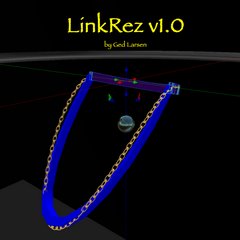
LinkRez is composed of 3 linked prims:
  • large transparent disk, that defines the "plane" of the top of the necklace
  • blue half ellipse, that defines the FRONT width, length, and angle of the front of the necklace
  • purple half ellipse, that defines the BACK width, length, and angle of the front of the necklace

Make sure "EDIT LINKED PARTS" is checked off in the Edit box to:
  • move the transparent sizing plane disk forwards / backwards / up / down to "center" the necklace properly on a posing avatar
  • stretch, rotate, and position the blue and purple guide ellipses, to fit the avatar neck
  • it's OK if part of the blue front half ellipse embeds in the avatar's chest; using a larger BEND parameter will have the necklace rez further forwards


=================
Chat command list
=================

Default chat channel to use commands: /1

BEND ##
  • ## is a number greater than 1.0
  • 1.0 will have the necklace follow the guide ellipse exactly
  • the bigger ## is, the farther out from the guide ellipse the necklace will go
  • 1.3 to 1.5 seems to work OK, but I want YOU all to tell me what works for you
PENDANT ##
  • ## is a number between 0.0 and 1.0
  • 0.0 is a perfectly rounded front
  • 1.0 is a completely pointy front
LINKTYPE ##
  • ## is one of ["FLAT", "INCREMENT", "ALTERNATE", "RANDOM", "CONSTANT"]
  • FLAT against body
  • INCREMENT the angle of each successive link by LINKANGLE
  • ALTERNATE the angle of each successive link by plus or minus LINKANGLE
  • RANDOM -- spins the link randomly along the axis of the necklace
  • CONSTANT -- applies a constant angle change from the "FLAT" angle

LINKANGLE ##
  • ## is a number in DEGREES that LINKTYPE INCREMENT, ALTERNATE, and CONSTANT uses

PATHTYPE ##
  • ## is one of ["SPLIT", "FOLLOW"]
  • determines whether the links "SPLIT" from the front, or "FOLLOW" one another
  • important when the link is NOT symmetric, along various axes

EVENLINKS
  • rezzes pairs of links only
  • this is the default

ODDLINKS
  • rezzes a single front and center link, and then paired links subsequently
  • looks good with rounded fronts (low PENDANT), and terrible for pointy fronts

TEST
  • using the necklace parametersabove, rezzes a "test necklace" made up of Temp-On-Rez links, so you can more easily test how well the necklace will fit

LINK LINKNAME~LENGTH~rotOffset~posOffset
  • create a necklace made up of a SINGLE prim type, without needing to use a notecard program
  • LINKNAME is the case-sensitive name of the link to be rezzed
  • LENGTH is the length in MILLIMETERS (not meters), of each link
  • rotOffset and posOffset are OPTIONAL: if they are not included, they will be assumed to be ZERO_ROTATION and ZERO_VECTOR
  • you can get LINKNAME~LENGTH~rotOffset~posOffset from the sizing board
  • e.g., LINK oval~6 --> rezzes an entire necklace using prim "oval", treating each oval as 6 millimeters long

RUN ##
  • run an entire necklace notecard program ##

CHANNEL ##
  • changes the chat channel for commands to ##

REZLIMIT ##
  • to prevent inadvertent infinite loops of rezzing, if a rez limit is exceeded, the script stops
  • defaults to 300 links rezzed
  • you can change the limit to ##

RESET
  • resets the script and guide ellipses
  • unfortunately, will only work if the script is not currently doing anything


==========================
Notecard program command structure
==========================

  • one command per line

GUIDE FRONT~#####
GUIDE BACK~#####
  • when you run a TEST, LINK, or NOTECARD, LinkRez will chat the ellipse GUIDE parameters, which you can copy and paste into future notecard programs
  • this includes the width, front length, front angle, back length, back angle information
  • this lets you set the size / position of the guide ellipses for future necklaces
  • I'd recommend including a comment, like "// sized for XYZ" or "// default avatar", so you know who the GUIDE fits well for

BEND, PENDANT, EVENLINKS, ODDLINKS
  • any of these commands can be included in a notecard program, BEFORE the first link is rezzed

LINKTYPE, LINKANGLE, PATHTYPE
  • any of these commands can be used anywhere in a notecard program

LINK LINKNAME~LENGTH~rotOffset~posOffset
  • rezzes that link, using the current linktype / linkangle / pathtype parameters
  • like above, rotOffset and posOffset are optional


REPEAT ##
...
...
...
ENDREPEAT
- repeats all the commands between REPEAT ## and ENDREPEAT, a total of ## times


REPEATUNTIL ##
...
...
...
ENDREPEAT

  • repeats all the commands between REPEAT ## and ENDREPEAT, UNTIL the links have been rezzed to ## DEGREES
  • 0 degrees is the front of the necklace; 90 degrees is the side; 180 degrees is the back
  • so REPEATUNTIL 90 ... ENDREPEAT will rezz links all the way up to the "side", before progressing with the rest of the notecard program

When the end of the notecard has been reached, LinkRez will continue rezzing the LAST link rezzed, with the current LINKTYPE settings, until it reaches the back of the necklace.


The simplest notecard program would consist of a single line with a LINK command:
- e.g., LINK oval~6
- would rez an entire necklace using prim "oval", treating each oval as 6 millimeters long


Tips:
  • all text on a line after a "/" is considered a comment and will be ignored; helpful to leave notes to yourself
  • "~" is frequently used as a delimiter (like for the LINK sizing board output), and shouldn't be used
  • blank lines will be ignored
  • be careful about extra spaces; they'll probably cause problems


================================
Tips on custom-fitting necklaces
================================

3 prim parts:
  • "root plane": transparent disk, controls the overall position of the necklace chain; can be tilted
  • "front blue guide ellipse": controls width, front half length and angle
  • "back purple guide ellipse": controls width, back half length and angle
2 parameters set by chat commands
  • /1 BEND ##: how much the necklace curves AWAY from the guide ellipse, to allow a rounded, over-the-shoulder drape
    • 1.0 (tracks guide ellipse perfectly); larger values come away from the guide ellipse further; try 1.3 to 2.0
  • /1 PENDANT ##
    • from 0.0 to 1.0, how pointy the front of the necklace will be

Pose avatar on posestand

Position the "root plane" to "center" the necklace chain properly
  • right-click the "root plane" and select edit (shouldn't matter if Edit Linked Parts is on or off)
  • move to the correct height, at the very top of the shoulders
  • move to centered, with respect to left and right
  • move forward and back, so that "break" between the ellipse front and back halves is at the very top of the shoulders
  • perhaps JUST in front of the tops of the shoulders works better; NEED TO TEST THIS MORE
NOW, make sure the Edit window is open, and that:
  • "Edit Linked Parts" is CHECKED
  • "Stretch Both Sides" is CHECKED

Stretch and position the "front half ellipse"
  • STRETCH (ALT-SHIFT) the width to the desired width
  • STRETCH (ALT-SHIFT) the front tab to the desired length
  • ROTATE (ALT) so that the VERY front of the ellipse just emerges from the avatars body
  • it's OK if parts of the ellipse are embedded in the avatar body
  • modifying the BEND parameter will change how much the chain comes "forward" from the plane of the half ellipse

Stretch position the "back half ellipse"
  • ROTATE (ALT) to the desired angle
  • STRETCH (ALT-SHIFT) the back tab so that the VERY back of the ellipse just hugs the back of the neck

Check how the necklace chain will look by using the "/1 TEST" command
  • rezzes a necklace chain, using Temp On Rez prims that will disappear after a minute or so
Adjust as needed

When it fits to your satisfaction:
  • issue the "/1 LINK primName~length" command, to create a necklace with just one type of link

    OR

  • issue the "/1 RUN notecardName", to execute a notecard program


==========
Other tips
==========

  • for a rounded front, choose a PendantFraction of 0.0

  • for a pointed front, choose a PendantFraction from 0.25 to 0.75 (maximum 1.0)

  • a bend parameter from around 1.3 to 1.5 seems to work well; NEED TO TEST THIS MORE

  • if the necklace is embedded in the avatars body, you can:
    • use a higher bend parameter
    • move the entire "root plane" forwards a little bit (and then readjusting the front and back half ellipses)

  • if the necklace comes "off" the avatar's torso too far, you can:
    • use a lower bend parameter
    • move the entire "root plane" back a little bit (and then readjusting the front and back half ellipses)

  • if you want the "top" of the necklace to be more rounded (less angular from front half to back half), use a higher bend parameter
    • because this will make the necklace come "out" away from the guide ellipse more, you may need to move the guide ellipses BACK a little bit

  • once you have settings that fit an avatar perfectly, SAVE them for re-use in future necklace chains
    • copy the settings from the CHAT HISTORY


==============
Other Ideas
==============

  • in general (especially with a pointed pendant front), you'll want an even number of necklace chain links
  • you can also specify that there be a single front link, for a total ODD number of necklace chain links
  • even better fits MIGHT be achievable by tilting the root plane forwards and backwards; NEED TO TEST MORE

Monday, May 21, 2007

Shared item: Siggy's Waterworks Animations

These are communal items, purchased for the use of Linji Haven and Peronaut Sim tenants.

Apparently, it's much harder to find COPY items than I had thought. Still, Sierra Mills chose a nice set of pool-side poses from Siggy's Waterworks for us all to share (although there are still some that we haven't gotten -- perhaps someone else might choose those).

From Siggy's Waterworks (Siggy Romulus) at WaterWorks (177, 39, 25), purchased 2007-05-21:
  • Chillin'
  • Layin'
  • Sunnin'
  • Lay back
  • Lazin'
  • Relax

LinkRez chain link programming working


A few days ago, I wrote about how symmetry and mirroring issues would affect using necklace links for collar fringes. I re-coded LinkRez so there are two different "path types," which I'm calling "split" and "follow" for now (based on the directions of the axis arrows of the links). In the previous post, I used little oval links with tiny red and green arrows on it, but the above picture shows more clearly how the two different path types will affect placement of chain links.

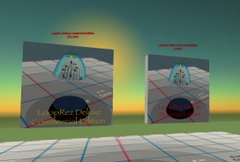
The picture on the left is using a "split" path type, which obviously doesn't work for this particular necklace chain link. However, the "split" path is exactly what you'd want, if there was "directionality" along the path of the necklace -- e.g., you wanted all the necklace links to point "backwards." The picture on the right is using a "follow" path type, which works better here, so that all the links are "following" one another.


Necklace chain link programming

The major progress is that I've added using notecards to "program" link placement, with lots of flexibility. I dissected a freebie necklace by Random Calliope (a truly gifted jeweler), so that I'd have links to play with, which included large and small oval pieces, and a metal ring.

Although Random's necklace is a full-permissions freebie, I don't have permission to actually distribute the links, so they won't be included with LinkRez. I'm just using them for testing purposes. (I got tired of looking at plywood blocks and links.)

Incidentally, it took me about 30 to 40 minutes to create ~2,000 prims worth of necklaces, including these four and another half dozen or so. They were each differently sized, shaped, and had different link compositions. Much of the time was actually tweaking scripts and notecards, and dissecting Random Calliope's necklace. In any case, much quicker than placing them by hand ;)


In the above picture, the right two necklaces use only a single link type, either a large or small oval. The one with the small oval is more than 255 prims, so wouldn't be linkable.

The left two necklaces use various notecard programs, to define what links to place, how many times to repeat, whether the links are placed flat or whether the links have alternating angle changes. Zooming in on the second necklace from the left:

Here, the necklace program consists of:
  • starting with a CENTER large oval link (so the total # of links will be ODD in this necklace; there's an option to have an EVEN number, too)
  • then, repeating a small oval + large oval set five times
  • then, repeating a large oval + metal ring four times (to "80 degrees")

    the above links were all placed "flat" to the body

  • finally, using just metal rings, but alternating the angle + and - 20 degrees from "flat" against the body
    • the "length" of the metal rings was decreased from what was used in the previous segment, so that they would intersect, while the earlier segment, they touched edge-to-edge
It's an ugly necklace, but a successful test of the notecard-driven necklace interface. Lots and lots of customizing is possible. "Repeat" segments can be for a set number of times, or until the necklace has rezzed an arbitrary number of degrees around the necklace path (0 degrees is the fron, 90 degrees is to the side, 180 degrees is all the way in the back).

I think it's pretty cool.


Female body shapes in SL

There's really not going to be any great way to fit each and every possible body shape in Second Life. What fits one avatar perfectly, digs into the collarbone or upper torso (which, ahem, tend to be rather generous in a large proportion of the female SL population) of another avatar, or floats far above the chest of a third person. For obvious reasons, shorter necklaces are much easier to fit, and necklaces that are longer in front have significantly more "issues."

I'm going to have to test (or, more likely, have some friends test) LinkRez on avatars of all different shapes and sizes, and collect more information and tips on how to best fit necklaces. The nice thing is that once you've found a set of settings that fits YOU perfectly, all subsequent necklaces made with those settings (regardless of changes in link composition) should fit just as well.


Peronaut mainland rental sim

There was some good activity with additional tenants joining the Peronaut community over the past week or so!

There are now six 2,048 sq m parcels left, several of which will adjacent to a new Public Park that Sierra Mills has been working on. It has a really nice mini-rock waterfall, and a curvy pond, as well as a gazebo. I think it's going to be great.

Sunday, May 13, 2007

LinkRez, a little progress

(two 12 millimeter links, precisely positioned on the sizing board)


Some people have been asking about LinkRez, my forthcoming necklace chain link-rezzing tool. There hasn't been a huge amount of progress (Peronaut Sim has been keeping me busy), but things are moving along.

Here's a quick update, one on a critically important LinkRez support utility (the "Sizing board"), and another is another rezzing option added, so that Virrginia Tombola might have better luck getting lace collars to come out of it.

LinkRez Sizing Board

One challenge with tiny, tortured prims, is that very often the "center" of the prim, as stored in SL, is NOT the "center" of the prim visually. Sometimes, that's a good thing, like when you cut a rectangular prim so that the "center" is on an edge, and then rotations make it look like you are rotating about a hinge there.

But, when you are trying to manipulate a micro prim, and the "center" is far outside the prim, it's much more of a pain to work with. The same problem exists with a rezzing script, because the position where the script rezzes the object is based on where SL thinks the center is. And, worse yet, all the rotations that scripts like LoopRez and LinkRez perform, also act about that "SL center point," so the prim gets moved all over the place, when you're simply trying to rotate the prim.

Since so many necklaces will depend on using micro-prims, it was absolutely critical to have LinkRez support tortured, weirdly centered and rotated prims. The "Sizing Board" utility is used to collect information about the desired "center" and "flat rotation" of a given prim / linked object, as well as determining the "length" of the necklace element. LinkRez then uses this information (in the form of a length, a rotation offset, and a position offset), to know the proper position and rotation to rez the prim.

The following shows how the sizing board is used:


  • a 12 mm link has been precisely positioned
    • placed "flat", on the Sizing Board
    • centered on all 3 axes
  • notice that the link is selected and that SL thinks that the "center" of the link is quite a bit below the visual center of the link


  • using shift-drag along the world X-axis, a copy of the link has been made, positioned exactly the distance apart I want two adjacent links to be placed in LinkRez
  • this allows LinkRez to determine the "length" of each link


  • activating the Sizing Board:
    • senses the two perfectly positioned links
    • determines its name
    • calculates the desired "length" of the link
    • the rotational offset between what SL calls the "zero rotation" and what we are defining as "flat"
    • the positional offset between what SL calls the "center" and what we want the center to be
  • the output line needs to be copied into the LinkRez notecard program

As I've said before, LinkRez will not be a "plug and play" tool, because of this required level of complexity.


Symmetry, mirrors, and requests

Long ago, my friend Virrginia Tombola asked about using a script to help place lace collars on her very complex Victorian ballgowns. Honestly, I don't know whether LinkRez is going to help at all with that, but when she reminded me in a comment on this blog, I realized that LinkRez, as previously written, would fail utterly at her purpose.

Given a particular necklace element, LinkRez originally placed the "left" side of the necklace, and then did a sort of "mirroring" of each link to the "right" side (it isn't really mirrored, but rotated so that the "path" of the links goes up the right side). This worked fine, if the left and right sides of the link were identical; i.e., symmetric about the L-R axis, along the path of a necklace


  • if you look closely, notice that the red arrows denoting the "path" axis of the links point in opposite directions
  • therefore, the green arrow, pointing to the "left" of the red arrow, point in OPPOSITE directions on the left and right of the necklace
  • this would play havoc with trying to place "collars" around the neck

However, a lace collar would typically have the lace on one "side" and nothing on the other side. And, if you "mirrored" the links, all the collars would be correct on one side of the neck, and flipped upwards on the other side.

So, I had to rewrite LinkRez to include an option -- instead of "mirroring" a link from one side to the other, with the paths of the links going from front to back of the neck, on both the left and right sides, with a new option, to keep the path orientation of ALL the links pointing in one direction ("counterclockwise" around the neck).


  • this time, notice that the "path axis" red arrows all point the same direction around the necklace, and so all the "left" sides of the beads point in the same direction.
  • if the "right" side of the bead contained lace trim, this MIGHT be useful for placing collars. Or, it might still look awful.
I could see situations where one "path" would be desired, and other times when the other path would be wanted. And, I could see where what is truly wanted is NOT something SL supports, which is truly mirroring a prim or multi-prim object, so I won't be able to do much about that.

All this required more struggles with rotations, but I think I've bludgeoned it into submission. But, I still don't know whether this will be of any utility for placing lace collars. I suspect not, because the back of the neck will likely be placed very oddly. Maybe I need to write "CollarRez"... Sorry, I think not...

Saturday, May 12, 2007

Communal item shopping sprees

To help foster community in the the sister Linji Haven and Peronaut rental sims, I've always wanted to support shared items. To help this, I will maintain an updated list of shared communal items, which upon request, can be placed on a tenant's rental parcels.

To further promote this, I'd like to make an offer: for sims that are fully rented, each week one tenant will be asked to select ANY purchase up to L$1,000, for a communal item. I will purchase the item, and then make it available to all tenants, in either Sim, upon request.

Communal item requirements:
  • items MUST have Copy permissions (otherwise, only a single resident could benefit from the purchase)
  • they MUST NOT require significant configuration (i.e., no items that will require me to read documentation, edit configuration notecards, etc.)
  • otherwise, anything goes, and I will almost certainly NOT exercise any sort of "veto power" (well, except against giant spinning particle-spewing advertisements). However, I think items that are likely to benefit as many people as possible (i.e., landscaping, furniture, etc.) would be best!

Tenants will be chosen in the order that they joined the community, once a week.

For the Linji Haven Sim, the order would be:
  • Sierra Mills
  • Taffy Allandale
  • Gabriel Watanabe
  • Eleanora Newell
  • Stephen Bentham / Caliah Lyon
  • camilla Yosuke
  • Charron Marseille / Roslin Petion / Morgaine Maktoum
  • Euterpe Zagoskin
  • Shizuka Hayashida
  • Tigress Jewell
  • Crispin Cleanslate
  • Tiy Ferraris
  • Harriet Hallard
  • JH + Jessie Gervasi
  • Patric Rotunno + Theodote Carthage
  • Anhayla Lycia

Once Peronaut Sim fills, the order will be:
  • D3: Johanna Hyacinth
  • D1: Lizbeth Saenz and Adriana Gustafson
  • C3: Nefertiti Nefarious
  • A4: Stuart Simonds
  • B3: Gabriel Watanabe
  • E2: Bodhisatva Paperclip
  • E4: Cameron Yip
  • C1: Kitten Sautereau
  • B1: Sierra Mills
  • E3: Axienne DeVaux
  • C4: Lucien Franciosa
  • E5: Shizuka Hayashida
  • A2: Mic Mills
  • E1b: Tigress Jewell
  • A1: Beauty Rosca
Items chosen by tenants will be added to the Communal Items page, listing who selected it and the date. I will definitely keep this offer going at least long enough to give everyone a chance to pick something, and depending on how popular / successful the program is, may choose to continue the program as long as possible.

Feel free to post comments to this page to suggest specific items that we all might be interested in checking out. Let the shopping begin!

Communal Items

As mentioned here, this is a list of Communal Items, available for placement on parcels in the Linji Haven and Peronaut mainland rental communities.

If you are a Linji Haven or Peronaut tenant and would like one of these objects for personal use, please contact Ged Larsen and specificy which object(s) and how many. A copy will be placed on your parcel, set to "Share with group," so that you can position and modify it (if permissions allow).

If you like these items, please support the creators by recommending their items or by purchasing their other products!


Buildings


Landscaping

  • Living Creek (by Zora Spoonhammer) (modifications by Ged Larsen, for standing pools)

Furniture

  • (none purchased yet)

Poses / Animations
  • Siggy's Waterworks Animations: Chillin', Layin', Sunnin', Lay back, Laazin', Relax (by Siggy Romulus, WaterWorks (177, 39, 25) ): chosen by Sierra Mills 2007-05-21


Suggestions for future purchases welcome!

Wednesday, May 9, 2007

Peronaut Sim, more tenants, and some ideas

A new tenant (and 2 "maybes")!

It was a pleasantly active night for the Peronaut mainland rental sim. Three people expressed interest, and one (Bodhisatva Paperclip) has decided to join the community! I got a chance to visit his previous home, and it was a lovely wooded grove, with streams, waterfalls, bridges, etc. I'm feeling really fortunate.

The two others (Axienne and Kitten) have mentioned which plots they're considering. We'll see!


How about another public park?

More and more, I think that what makes a pleasant sim is not only nice builds, but also nice parks. It's clear that the central Peronaut Park has driven up the "desirability" of the neighboring parcels. Sierra Mills did such a great job with the park, that I claimed parcel B2 for my new home, overlooking the pond.

I already think Peronaut is beautiful, but then I got to thinking tonight, even more public spaces would further improve it. I'm very seriously considering making B4 into another public park; sort of a little oasis, surrounded by a number of rental parcels. It's a flat parcel, unlike the central park, which should make for a nice contrast in styles.


And a boat launch?

Lastly, Bodhisatva mentioned in passing his hopes for a boat launch, and I realized that the corner parcel that I've been holding on to has fairly little "buildable land" (and I am completely unwilling to "pave over" the water), but a GOOD amount of water. Hmmm... I'm really liking the idea of a small public boat launch, especially if we get lucky enough to have the two neighboring sims keep some sort of waterway open.

I'm very excited with how Peronaut is shaping up. :)

Sunday, May 6, 2007

Preview: LinkRez, a necklace chain generator


(Custom-fit, plywood necklaces -- it's the new thing! This is done with alternating links, +/- 20 degrees)


(early path + orientation test, with an unsightly "break" between the front and back of the necklace, now corrected)

It's been a very long time since I've worked seriously on script-assisted necklace generating, although I did post a list of musings, way back in January, about the challenges a decent one would face. Necklace generating was actually something I thought about, back in November when I first started in SL, and LoopRez was actually a spin-off, a much "easier" project.

Johanna Hyacinth has done great work as well, with necklace generating, and it was partly from this shared interest that we met, long ago. Her earliest blog posts talk about the challenges, very similar to my list of musings. We chatted recently, and it seemed that unlike "other individuals," she was perfectly fine with my again taking up the challenge.

I think I'm making decent progress, and thought I'd share some of the initial results. There is a LOT of work to be done yet, but I'm pretty excited about how it's turning out.

First off -- this really is NOT a "Necklace Generator." I think the real challenge in creating beautiful jewelry is the skill of manipulating tiny prims into ornate and intricate centerpieces. However, I suspect a lot of the tedium in making a nicely fitted necklace has to do with positioning either simple or intricate "links" into a chain that fits about an Avatars neck, shoulders, and torso.

So, LinkRez will instead be a tool to assist in the tedious process of placing chain "links" with proper path and orientation, about an avatar's neck, and do it with maximal configurability. It's definitely a seriously difficult challenge, which is why, I suspect, there aren't more such aids available now. The amount of flexibility I plan to build into LinkRez makes me suspect that it will be a rather complex "power user" tool -- one that will require quite a bit of SL building experience (edit linked parts, precision placement and rotation of micro-prims, notecard editing).

Here's what I've (mostly) accomplished so far, and what more I hope to do:
  • highly configurable "shape" of the path
    • width
    • front drop
    • back drop
    • "sigmoidicity" of the front drop; i.e., how rapidly the "drop" occurs
    • should allow nearly perfect placement, customized to an individual avatar's shape, with only a minute or so of tweaking

  • allow for a front "round" vs. pointed "pendant" shape

  • flexibility in link orientation / rotation
    • "flat" against skin surface
    • "incrementing" angle, adding a definable rotation with each successive link; e.g., a progressive "chain link"
    • "alternating" angle, where each successive link alternatives by plus or minus a definable rotation
    • "random"; e.g., round beads on a string, which can rotate freely and randomly

  • allow for "links" that are multi-prim linked objects
Challenges in progress:
  • allow for "links" that are made up of tortured prims (which sometimes have very funky center points and rotations); PARTIALLY SOLVED, WOOT! (see the linked chains)

  • use of multiple different link types within a chain, each with a different size

  • notecard driven chain link program, allowing use of:
    • a single "link" type
    • a user-defined sequence of links
    • repeating "sets" of links; i.e., [A-B-C]-[A-B-C]-[A-B-C], etc.
    • allowing changing link orientation shapes throughout the necklace; i.e. [flat: A-B-C]-random:D-D-[flat: A-B-C]

(the "sizing aids" are visible here, as a dark blue ellipse edge on the chest, with another one not visible in back, as well as the transparent partial disc)


(this is my first success at using tortured prims, with position and rotation offset corrections required; it's also an example of "alternating" link rotation, alternating "+30" and "-30" degrees from the orientation that would be "flat")


The following are examples of shaping and configuration parameters:

Two views of varying "sigma" bendiness, for necklace chains that are otherwise the SAME size. Farthest left is "planar" (flat), and the subsequent ones come "forward" more, before diving down in front.


Four different link types. From left to right: "flat," "increment," "alternating," and "random"


Pendants: increasing "pointiness" for chains that will have a pendant hanging in front


I'm really rather excited by the progress, but there's a LOT more to do, before LinkRez is ready for release though.

Saturday, April 21, 2007

Peronaut: new mainland rental sim


Peronaut, a mixed residential / commercial mainland rental sim without casinos, clubs, camping, or eyesores. Beautiful park, nice walking paths, and ocean views.
17 parcels claimed
0 parcels reserved
6 parcels remaining


Parcels in Peronaut Sim AVAILABLE

After my very positive experiences with the Linji Haven mainland rental sim, I've decided to try another mainland rental sim -- the Peronaut Sim, with improvements (I think) from lessons learned.

Again, it's an unthemed sim, with a generally sensible covenant that tries to keep it as pleasant as possible. The sim itself is beautiful, with both nice flat areas and rolling hills, as well as access to water.

Parcels are now available for rent. The Peronaut Covenant is very similar to that of Linji Sim. Some differences include:
  • setting aside dedicated land for roads and paths, as well as a single large central park, rather than small protected parcels
    • this park is shaping up REALLY nicely, with a pond at top, waterfall segments, and a wandering stream to the ocean
  • pre-defined sizes and shapes of the available parcels, which are now all either 2,048 or 3,072 sq m
  • "squaring off" the parcels, so that they are more usable, than the 32 x 64 m (2,048 sq m) parcels frequently found in Linji
  • the covenant is changed to be a bit stricter about build heights, because that was occasionally an issue in Linji
Rental parcels are again going to be made available in a first-come, first-served basis. Like before, if you are interested, contact Sierra Mills (or Ged Larsen), or post a comment here, with your SL name and which parcel you are interested in. We can "reserve" the parcel for you for 3 days or so, after which we'll again make it available to other people.


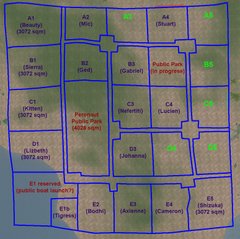
Peronaut Public Park:

Parcels claimed:

  • E1 / B2: Ged Larsen
  • D3: Johanna Hyacinth
  • D1: Lizbeth Saenz and Adriana Gustafson
  • C3: Nefertiti Nefarious
  • A4: Stuart Simonds
  • B3: Gabriel Watanabe
  • E2: Bodhisatva Paperclip
  • E4: Cameron Yip
  • C1: Kitten Sautereau
  • B1: Sierra Mills
  • E3: Axienne DeVaux
  • C4: Lucien Franciosa / Caliae Jewell
  • E5: Shizuka Hayashida
  • A2: Mic Mills
  • E1b: Tigress Jewell
  • A1: Beauty Rosca

Parcels reserved (held for 3 days):

  • (no current reservations)

Peronaut Sim


The below information is being kept for archival purposes only.


--== Peronaut ==--

This is the
charter of the Peronaut Sim (last updated 2007-April-21). Whether you are interested in joining this community or not, questions, comments, and suggestions are very welcome.

The goal of the Peronaut Sim is to provide:
  • an unthemed mixed-residential and low-impact commercial oasis on the Mainland
  • a community of like-minded individuals who believe that the Mainland can still be a beautiful, wonderful, minimal lag place to enjoy Second Life
  • the lowest price possible
To insure that the Sim can maintain it's zoning guidelines, it is a rental only community. Estate Managers to contact for more information or problems: Ged Larsen and Sierra Mills


ZONING GUIDELINES


Residential and low-impact commericial

Guidelines:
  • be considerate
  • low-impact commercial welcomed
  • small events encouraged
  • no Casinos, no Clubs, no Camping, and no Crap (ad farms, lag hogs, incredibly ugly builds)
Lag control
  • try to use efficiently-written scripts, without loads of listeners and scans
  • try to use the minimum-sized texture that gives you good results
Spelling it all out

Really, if you're just being considerate of others, you don't need to read these details. If you are trying to use this list to find loopholes of what you can get away with, this community is probably not for you.

And,
if you and ALL your neighbors are OK with it, bending the guidelines is fine too. Just see "Conflict Resolution".
  • restrict build heights to twice the distance from the nearest neighbor's parcel boundary
    • a 2:1 build height tool will be provided to you to help you determine whether you are within bounds
    • IF you and your neighbor agree, you are free to violate this rule
    • however, agreement should be obtained BEFORE building higher / closer than allowed

  • try not to obstruct your neighbor's views
  • no major eyesores
  • no excessive particle effects
  • no flashing / rotating / neon signs
  • no banlines (banning specific avatars is fine)
  • no walls or fences that completely close off your land
  • skyboxes shouldn't be visible from ground level builds
  • no non-consensual combat
  • events should not be so large and frequent as to cause problems for other residents


COMMUNITY

Goal: it would be wonderful if instead of a bunch of separate carved out parcels, we had a community. Of course, this can never be something dictated, but I'd welcome ideas to help promote this.

To promote this:
  • a central 4,928 sq m public park to provide a focus and meeting place for the community
  • footpaths, small roads, and stopping areas (5,504 sq m) set aside, to encourage foot-exploration of the sim
  • shared resources (e.g., pre-fab buildings, landscaping objects, resident creations, etc.)
    • Barnesworth Anubis pre-fab buildings and landscaping
    • "Living Creek" streams and waterfalls landscaping
    • suggestions welcome for additional community purchases (copyable items)


CONFLICT RESOLUTION
  • I want to remain as absolutely hands-off as possible, hoping that the simple rule of being considerate towards others will minimize conflict. And, I hope that people will be as open-minded and accepting as possible of other people's tastes. But, conflicts happen.
  • if 3 members of the community have a grievance against another member, and a Peronaut Estate Manager agrees, then the grievance must be addressed.


RENTING

In addition to weekly rent, there may be an
initial L$1 per sq m non-refundable joining fee, which will be used for community purchases and other expenses. This fee is waived for the founding members of the Sim.

Weekly rent will be closely tied to the Linden Lab Mainland Tier Schedule, recalculated in L$ per week at the current L$ sell exchange rate, correcting for the 3.5% LL exchange fee.

If the current L$ sell rate is L$267 per US$1 + 3.5% LL exchange fee:
  • 2,048 sq m: US$15/month =~ L$4,145/month =~ L$951/week
  • 3,072 sq m: US$20/month =~ L$5,527/month =~ L$1,268/week
  • 4,096 sq m: US$25/month =~ L$6,908/month =~ L$1,586/week
  • prim allotment: 234 prims per 1,024 sq m
    • extra prim allotment may be rentable, based on availability. The rate will be based on the 4,096 sq m parcel rental rate; i.e., US$3.125/month for an extra 117 prims

  • rent to be paid weekly, in advance
    • there will be no grace period for late rent
    • if there are people on the waitlist when the rent expires, it is possible that the parcel will be re-assigned to a new tenant

  • full refunds of remaining rent, with no penalty, if one week advance notice is given
    • otherwise, a maximum penalty of 1 week's rent will be assessed, and the remainder refunded

  • no plans to increase rent
    • the only reason I will raise rent would be if LL's mainland tier prices increase. If this were to happen, I would increase rental rates proportionally, and offer current tenants the option to cancel their leases with full refunds without penalty

  • no support for sub-leasing
    • you will be able to add others to the Peronaut Group, but they will be regular group "Members" without the "Resident" abilities that tenants will have (see below)
    • however, on a case-by-case basis, estate managers can grant "Resident" abilities to multiple people who are sharing a parcel

GROUP ROLE ABILITIES FOR RESIDENTS

The group role abilities listed below are my attempt to give maximal flexibility to Peronaut Sim residents, while trying to keep inadvertent disasters to a minimum. They may be adjusted, as necessary.

Group Roles
  • Owner (Ged Larsen) / Estate Manager
    • Estate manager has all abilities EXCEPT:
      - assign members to any roll
      - assign and remove abilities in roles
      - deed land and buy land for group (?)
      - abandon land to governor lindon
      - set land for sale info
      - pay group liabilities and receive group dividends
  • Resident
    • this is the baseline role that ALL renters will get
  • Regular Member
    • residents can invite people to join the group, who can then set objects to the Peronaut group, avoiding auto-return
    • they will NOT, however, have access to most other Resident abilities
Group abilities, complete list

Membership
  • Invite People to this Group (ALL)
    • non-owners can only invite people to the plain "member" status
  • Eject Members from this Group (ALL)
    • non-owners can only eject people who have plain "member" status
  • Toggle 'Open Enrollment' and change 'Signup Fee' (OWNER)
Roles
  • Create New Roles (OWNER)
  • Delete Roles (OWNER)
  • Change Role names, titles, and descriptions (OWNER)
  • Assign Members to Assigner's Roles (OWNER)
  • Assign Members to Any Role (OWNER)
  • Remove Members from Roles (OWNER)
  • Assign and Remove Abilities in Roles (OWNER)
Group Identity
  • Change Charter, Insignia, 'Publish on the Web', and which members are publicly visible in Group Information (OWNER)
Parcel Management
  • Deed land and buy land for group (OWNER)
  • Abandon land to Governor Linden (OWNER)
  • Set land for sale info (OWNER)
  • Subdivide and join parcels (OWNER)
Parcel Identity
  • Toggle 'Show in Find Places' and set category (ALL)
  • Change parcel name, description, and 'Publish on the Web' settings (ALL)
  • Set landing point and set teleport routing (ALL)
Parcel Settings
  • Change music & media settings (ALL)
  • Toggle 'Edit Terrain' (OWNER)
  • Toggle various About Land > Options settings (ALL? or ON REQUEST?)
Parcel Powers
  • Always allow 'Edit Terrain' (ALL? or ON REQUEST?)
  • Always allow 'Fly' (ALL)
  • Always allow 'Create Objects' (ALL)
  • Always allow 'Create Landmark' (ALL)
  • Allow 'Set Home to Here' on group land (ALL, regular members)
Parcel Access
  • Manage parcel Access lists (OWNER; no general banlines allowed)
  • Manage parcel Ban lists (ALL)
  • Change parcel 'Sell passes...' settings (ALL)
  • Eject and freeze Residents on parcels (ALL)
Parcel Content
  • Return objects owned by group (OWNER)
  • Return objects set to group (OWNER)
  • Return non-group objects (ALL)
  • Landscaping using Linden plants (ALL)
Object Management
  • Deed objects to group (OWNER)
  • Manipulate (move, copy, modify) group-owned objects (OWNER)
  • Set group-owned objects for sale (OWNER)
Accounting
  • Pay group liabilities and receive group dividends (OWNER)
Notices
  • Send Notices (ALL)
  • Receive Notices and view past Notices (ALL, and regular members)
Proposals
  • Create Proposals (ALL)
  • Vote on Proposals (ALL, and regular members)

Thursday, April 5, 2007

Linji Haven has filled

Linji Haven has filled -- all parcels have now been claimed.

In the future, further announcements will be moved to Linji Haven's own blog page at http://www.linjihaven.com/, provided and administered, thanks to Gabriel Watanabe.

A public forum is also in the process of being set-up, administered by Gabriel Watanabe and Crispin Cleanslate -- http://www.linjihaven.com/forum/ -- and I would encourage residents to comment, discuss, request, and contribute anything and everything they would like.

I'd like to thank everybody for their support!


Founding Members of Linji Haven
  • Ged Larsen
  • Sierra Mills
  • Taffy Allandale
  • Gabriel Watanabe
  • Eleanora Newell
  • Stephen Bentham / Caliah Lyon
  • camilla Yosuke
  • Charron Marseille / Roslin Petion / Morgaine Maktoum
  • Euterpe Zagoskin
  • Shizuka Hayashida
  • Tigress Jewell
  • Crispin Cleanslate
  • Tiy Ferraris
  • Harriet Hallard
  • Tamala Tombola
  • JH + Jessie Gervasi
  • Patric Rotunno + Theodote Carthage
It's silly, but I think I'm going to ask that somebody create a little chunk of prim rock, with our names "engraved" in it, to place in our central public park. Nothing Starax-like, but I think it'd be nice to commemorate our achievement. Any volunteers?

Wednesday, April 4, 2007

LoopRez texture problems? Need comments!

Recently, LoopRez users have described a really mysterious sounding bug (or BUGS), with textures reverting to previous ones, textures changes after linking (although I'm not clear why a user would be re-linking a skirt, after starting to work on it), etc.

Because several people have mentioned these problems, and yet I can't reproduce the problem on my own, I'd love it if people could post comments to this blog entry, describing in step-by-step detail what they did, and what happened. That way, I'm much more likely to be able to figure out what happened, and try to fix it.

Please post! And if you have the ability to host pictures, and think pictures would make it more clear, please do that too!

I hope, once I have more of a clue, to be able to get together with LoopRez users in-world, in-person, to come to a solution, too.

Thanks!

Tuesday, April 3, 2007

Linji Haven, almost completely filled

Wow, the enthusiasm for this project, and the amount of diversity, creativity, and talent that have come to the Linji sim is really amazing. We have creators of clothing, jewelry, skin textures, buildings, landscaping; future museum curators; public space designers; and at least one scripter (who hasn't done squat for scripting lately, unfortunately).

Invitations to participate were taken starting March 27, and now, 7 days later, every parcel has been spoken for, and all but two parcels have residents who have completed the rental arrangements. (Two potential residents have requested a little extra time to decide, but I was too excited and impatient and wanted to post about our community's great start.)

So, what now? Obviously people are going to be busy building, creating the spaces that they envision. But beyond that, there are some chores, some projects, and some ideas I have:
  • Sierra Mills, as well as Ged Larsen, can now be asked to handle Linji Haven estate management issues; we'll share in the management chores
    • send requests to whichever of us is around, or by notecard to both (I'll probably set up a Drop A Notecard kiosk, that will get the requests to us)
    • if she has any difficulties, while she's still in the training and trial by fire phase, she'll forward the requests to me :)
    • this is being done so I don't burn out and go stark raving mad, which would probably be bad for the sim

  • the covenant has to be finalized and agreed to by all residents; obviously, nothing construed as potentially "negative" will be added, but clarification and additions are necessary
    • current build height rules are NOT tenable, and require clarification to prevent conflict and misunderstanding
    • refund and late payment policies need to be described
    • state that rent will never be increased, so long as mainland tier doesn't increase
    • how to handle filling vacancies
    • starting a L$1 or L$2 per sq m initial buy-in charge for future tenants, after the Sim fills, to be used for Sim-related improvements and support (some ideas below)
In case you're curious, at this point, with this kind of tenancy, the future of the Linji Haven community Sim is absolutely assured, from a financial standpoint -- it can continue indefinitely, so long as tenancy is this good, and mainland tier doesn't go up. If you're curious, I'd be willing to post the nitty gritty details of the financials -- I'm perfectly fine with an "open book accounting" policy.

I'll admit this though: the only major threat to the continued long-term existence of Linji Haven is if maintaining it becomes a terrible burden, chore, or hassle to me. I'm a reluctant organizer of this, and don't really want to be a "landlord" if it means conflict resolution, facing disputes and arguments, dealing with non-payment, etc. Luckily, from what I can see so far, we have a GREAT group of people, so I'm hoping this won't be an issue, and I can just step back from the organizing, and let you guys just create and have fun :)

OK, those were the chores, ranging from unpleasant, to merely boring. Now for the more fun stuff:
  • http://linjihaven.com/
    • we happen to have at least two professional web / IT professionals in our midst. Gabriel Watanabe has registered a domain name for us and set up a Wordpress blog, which may take over much of the role of this blog for Linji Haven-related business
    • Crispin Cleanslate has also volunteered, if Gabriel is willing, to share responsibility for maintaining a phpbb forum
    • for those who are familiar with Linden Lab's web services, this would be analogous to the official Linden Lab Second Life Blog and the official SL Forums; one might be best for announcements and official business and comments, and the other for community discussions and planning

  • Community benefits. Why would we need a place to discuss anything? well, other than complaining about management, I'd like to solicit suggestions for perks and benefits to the community. Here are some ideas:

    • community "wish list" for items to be purchases for communal use, for example the recently acquired Barnesworth Anubis "Larsen" pre-fab shops. Any item that might be useful to the community that is COPY / NO TRANSFER, I'd be wiling to consider purchasing and providing to Linji Haven, set to "Share with group"

    • Radio Linji. If there were interest, I could lease a Shoutcast external server to distribute our own audio streams. Some uses might be to broadcast live performances (I have some friends in the classical music community; I'm sure some of you might have friends in more normal music), or else to simply share (inflict?) our own music streams as DJ's. (Will have to look into the limits of "fair use", though, of audio streams.)

    • Shared / discounted creations. Obviously, this is totally up to the content creators, but I personally would like to eventually offer up script gadgets and tools that might be of interest to others. Even collections of useful freebies that are used in the Sim (like, shared cobblestone path textures, lamp posts, and whatnot), could be housed in a communal location.


    • any other suggestions?
I think we're off to a great start, far better than I ever hoped for! And somehow, I think the best is yet to come. :)

Monday, April 2, 2007

Linji, idea for shared prefabs


Caliah Lyon (who has excellent taste) suggested that I check out prefab builds by Barnesworth Anubis. And they ARE really really nice builds, for the residential as well as commercial work. Someday, I'd like to have a script thingie store, and one of these might work nicely.

But the above advertisement got me thinking -- if there was interest, I'd be willing to purchase the 11-store pack, and share them out on Linji Group-deeded land. They are "COPY/MOD" and I think it would be fair use, so long as they weren't "over-used".

I'd like to place that nice park bench, maybe a pair or two in each Linji Haven Protected Land area (even though I know they'll be a bit prim-expensive, they just look nice!). The table / umbrella / chairs might also be nice, if anyone felt inclined to build a cafe.

I'm more likely to go ahead with this if anybody else will get use out of a pre-fab store front, too. If it's just me, then I might as well just get things separately.

Any interest?

Edited to add: this collection has been purchased. All components are now available to any Linji Haven residents upon request.

Sunday, April 1, 2007

Linji Haven, proposal for more green space

I am proposing to set aside a few 1,024 sq m parcels as "Linji Haven Protected Land", along a border of the sim. If this seems like it'd be a popular idea, I would place in the covenant the promise that these areas would remain protected and unrented.

These plots would NOT be accessible for public projects, but would instead remain green spaces, with a few trees, bushes, maybe paths and a park bench or two. In fact, I think I'd like to contact the SL Arbor Project folks for suggestions.

The purpose of these parcels would be to help provide more open green space. A side-benefit would be that they could be used to provide Residents with a potential source of extra prims, which could be made available for rental -- rates to be determined, but hopefully none of you have run out yet ;)

Comments or suggestions?